


[Dec-2024] Dumps Practice Exam Questions Study Guide for the FCSS_SASE_AD-23 Exam
FCSS_SASE_AD-23 Dumps with Practice Exam Questions Answers
NEW QUESTION # 17
How does FortiSASE hide user information when viewing and analyzing logs?
- A. By hashing data using salt
- B. By encrypting data using Secure Hash Algorithm 256-bit (SHA-256)
- C. By hashing data using Blowfish
- D. By encrypting data using advanced encryption standard (AES)
Answer: A
Explanation:
FortiSASE hides user information when viewing and analyzing logs by hashing data using salt. This approach ensures that sensitive user information is obfuscated, enhancing privacy and security.
* Hashing Data with Salt:
* Hashing data involves converting it into a fixed-size string of characters, which is typically a hash value.
* Salting adds random data to the input of the hash function, ensuring that even identical inputs produce different hash values.
* This method provides enhanced security by making it more difficult to reverse-engineer the original data from the hash value.
* Security and Privacy:
* Using salted hashes ensures that user information remains secure and private when stored or analyzed in logs.
* This technique is widely used in security systems to protect sensitive data from unauthorized access.
References:
* FortiOS 7.2 Administration Guide: Provides information on log management and data protection techniques.
* FortiSASE 23.2 Documentation: Details on how FortiSASE implements data hashing and salting to secure user information in logs.
NEW QUESTION # 18
Which secure internet access (SIA) use case minimizes individual workstation or device setup, because you do not needto install FortiClient on endpoints or configure explicit web proxy settings on web browser-based end points?
- A. SIA for agentless remote users
- B. SIA for SSLVPN remote users
- C. SIA for site-based remote users
- D. SIA for inline-CASB users
Answer: A
NEW QUESTION # 19
When viewing the daily summary report generated by FortiSASE. the administrator notices that the report contains very little data. What is a possible explanation for this almost empty report?
- A. Log allowed traffic is set to Security Events for all policies.
- B. The web filter security profile is not set to Monitor
- C. There are no security profile group applied to all policies.
- D. Digital experience monitoring is not configured.
Answer: A
Explanation:
If the daily summary report generated by FortiSASE contains very little data, one possible explanation is that the "Log allowed traffic" setting is configured to log only "Security Events" for all policies. This configuration limits the amount of data logged, as it only includes security events and excludes normal allowed traffic.
* Log Allowed Traffic Setting:
* The "Log allowed traffic" setting determines which types of traffic are logged.
* When set to "Security Events," only traffic that triggers a security event (such as a threat detection or policy violation) is logged.
* Impact on Report Data:
* If the log setting excludes regular allowed traffic, the amount of data captured and reported is significantly reduced.
* This results in reports with minimal data, as only security-related events are included.
References:
* FortiOS 7.2 Administration Guide: Provides details on configuring logging settings for traffic policies.
* FortiSASE 23.2 Documentation: Explains the impact of logging configurations on report generation and data visibility.
NEW QUESTION # 20
Which two components are part of onboarding a secure web gateway (SWG) endpoint? (Choose two)
- A. FortiSASE CA certificate
- B. FortiClient installer
- C. proxy auto-configuration (PAC) file
- D. FortiSASE invitation code
Answer: A,C
Explanation:
Onboarding a Secure Web Gateway (SWG) endpoint involves several components to ensure secure and effective integration with FortiSASE. Two key components are the FortiSASE CA certificate and the proxy auto-configuration (PAC) file.
* FortiSASE CA Certificate:
* The FortiSASE CA certificate is essential for establishing trust between the endpoint and the FortiSASE infrastructure.
* It ensures that the endpoint can securely communicate with FortiSASE services and inspect SSL/TLS traffic.
* Proxy Auto-Configuration (PAC) File:
* The PAC file is used to configure the endpoint to direct web traffic through the FortiSASE proxy.
* It provides instructions on how to route traffic, ensuring that all web requests are properly inspected and filtered by FortiSASE.
References:
* FortiOS 7.2 Administration Guide: Details on onboarding endpoints and configuring SWG.
* FortiSASE 23.2 Documentation: Explains the components required for integrating endpoints with FortiSASE and the process for deploying the CA certificate and PAC file.
NEW QUESTION # 21
An organization wants to block all video and audio application traffic but grant access to videos from CNN Which application override action must you configure in the Application Control with Inline-CASB?
- A. Permit
- B. Pass
- C. Allow
- D. Exempt
Answer: D
Explanation:
To block all video and audio application traffic while granting access to videos from CNN, you need to configure an application override action in the Application Control with Inline-CASB. Here is the step-by-step detailed explanation:
* Application Control Configuration:
* Application Control is used to identify and manage application traffic based on predefined or custom application signatures.
* Inline-CASB (Cloud Access Security Broker) extends these capabilities by allowing more granular control over cloud applications.
* Blocking Video and Audio Applications:
* To block all video and audio application traffic, you can create a policy within Application Control to deny all categories related to video and audio streaming.
* Granting Access to Specific Videos (CNN):
* To allow access to videos from CNN specifically, you must create an override rule within the same Application Control profile.
* The override action "Exempt" ensures that traffic to specified URLs (such as those from CNN) is not subjected to the blocking rules set for other video and audio traffic.
* Configuration Steps:
* Navigate to the Application Control profile in the FortiSASE interface.
* Set the application categories related to video and audio streaming to "Block."
* Add a new override entry for CNN video traffic and set the action to "Exempt." References:
* FortiOS 7.2 Administration Guide: Detailed steps on configuring Application Control and Inline-CASB.
* Fortinet Training Institute: Provides scenarios and examples of using Application Control with Inline-CASB for specific use cases.
NEW QUESTION # 22
During FortiSASE provisioning, how many security points of presence (POPs) need to be configured by the FortiSASE administrator?
- A. 0
- B. 1
- C. 2
- D. 3
Answer: A
Explanation:
During FortiSASE provisioning, the FortiSASE administrator needs to configure at least one security point of presence (PoP). A single PoP is sufficient to get started with FortiSASE, providing the necessary security services and connectivity for users.
* Security Point of Presence (PoP):
* A PoP is a strategically located data center that provides security services such as secure web gateway, firewall, and VPN termination.
* Configuring at least one PoP ensures that users can connect to FortiSASE and benefit from its security features.
* Scalability:
* While only one PoP is required to start, additional PoPs can be added as needed to enhance redundancy, load balancing, and performance.
References:
* FortiOS 7.2 Administration Guide: Provides details on the provisioning process for FortiSASE.
* FortiSASE 23.2 Documentation: Explains the configuration and role of security PoPs in the FortiSASE architecture.
NEW QUESTION # 23
Refer to the exhibits.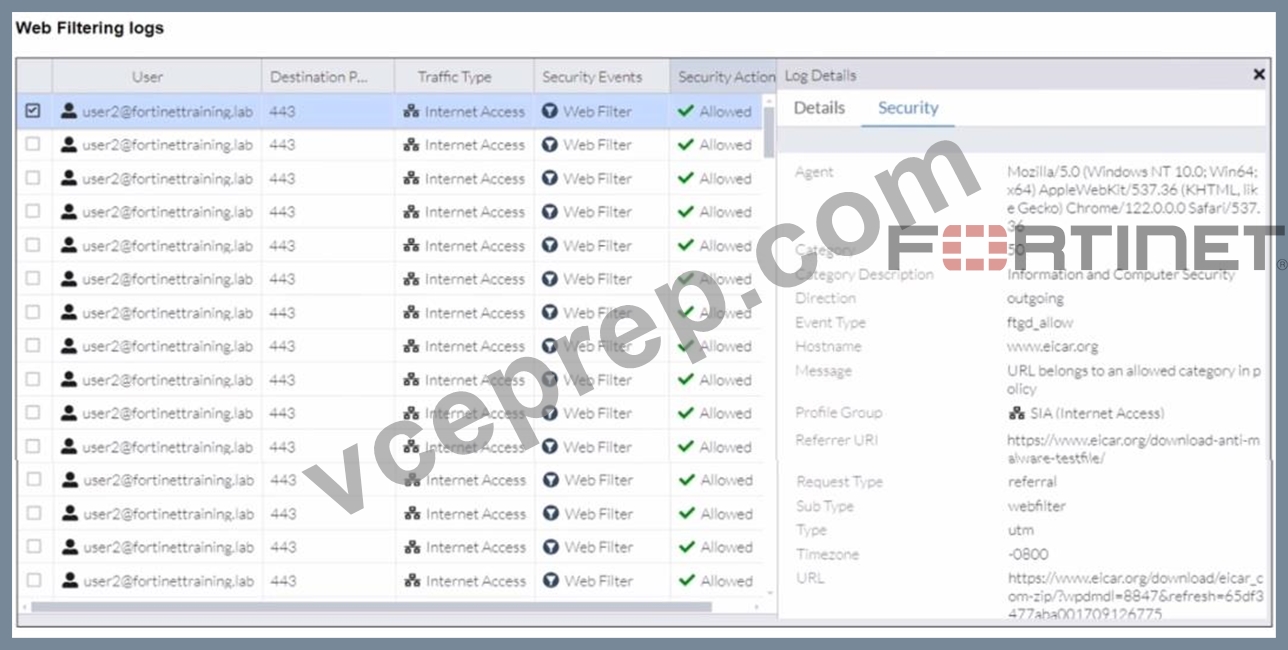


A FortiSASE administrator has configured an antivirus profile in the security profile group and applied it to the internet access policy. Remote users are still able to download the eicar.com-zip file from https://eicar.org.
Traffic logs show traffic is allowed by the policy.
Which configuration on FortiSASE is allowing users to perform the download?
- A. IPS is disabled in the security profile group.
- B. Web filter is allowing the traffic.
- C. The HTTPS protocol is not enabled in the antivirus profile.
- D. Force certificate inspection is enabled in the policy.
Answer: B
Explanation:
Based on the provided exhibits and the configuration details, the reason why users are still able to download the eicar.com-zip file despite having an antivirus profile applied is due to the Web Filter allowing the traffic.
Here is the step-by-step detailed explanation:
* Web Filtering Logs Analysis:
* The logs show that the traffic to the destination port 443 (which is HTTPS) is allowed and the security event triggered is Web Filter.
* The log details indicate that the URL belongs to an allowed category in the policy and thus, the traffic is permitted by the Web Filter.
* Security Profile Group Configuration:
* The Web Filter with Inline-CASB section indicates that the sitewww.eicar.orgis being monitored (93 occurrences) and not blocked.
* Since the Web Filter is set to allow traffic from this site, the antivirus profile will not block it because the Web Filter decision takes precedence.
* Antivirus Profile Configuration:
* Although the antivirus profile is configured, the logs do not show any antivirus actions being triggered. This indicates that the web filter is overriding the antivirus action.
* Policy Configuration:
* The policy named "Web Traffic" shows that it has logging enabled and is set to accept traffic.
* The profile group "SIA" applied to this policy includes both Web Filter and Antivirus settings.
However, since the Web Filter is allowing the traffic, the antivirus profile does not get the chance to inspect it.
References:
* FortiGate Security 7.2 Study Guide: Provides details on the precedence of web filtering over antivirus in security profiles.
* Fortinet Knowledge Base: Detailed explanation of web filtering and antivirus profiles interaction.
NEW QUESTION # 24
Refer to the exhibits.

When remote users connected to FortiSASE require access to internal resources on Branch-2. how will traffic be routed?
- A. FortiSASE will use the AD VPN protocol and determine that traffic will be directed to Branch-2 directly, using a dynamic route
- B. FortiSASE will use the SD-WAN capability and determine that traffic will be directed to HUB-1, which will then route traffic to Branch-2.
- C. FortiSASE will use the AD VPN protocol and determine that traffic will be directed to Branch-2 directly, using a static route
- D. FortiSASE will use the SD-WAN capability and determine that traffic will be directed to HUB-2. which will then route traffic to Branch-2.
Answer: B
Explanation:
When remote users connected to FortiSASE require access to internal resources on Branch-2, the following process occurs:
* SD-WAN Capability:
* FortiSASE leverages SD-WAN to optimize traffic routing based on performance metrics and priorities.
* In the priority settings, HUB-1 is configured with the highest priority (P1), whereas HUB-2 has a lower priority (P2).
* Traffic Routing Decision:
* FortiSASE evaluates the available hubs (HUB-1 and HUB-2) and selects HUB-1 due to its highest priority setting.
* Once the traffic reaches HUB-1, it is then routed to the appropriate branch based on internal routing policies.
* Branch-2 Access:
* Since HUB-1 has the highest priority, FortiSASE directs the traffic to HUB-1.
* HUB-1 then routes the traffic to Branch-2, providing the remote users access to the internal resources.
References:
* FortiOS 7.2 Administration Guide: Details on SD-WAN configurations and priority settings.
* FortiSASE 23.2 Documentation: Explains how FortiSASE integrates with SD-WAN to route traffic based on defined priorities and performance metrics.
NEW QUESTION # 25
To complete their day-to-day operations, remote users require access to a TCP-based application that is hosted on a private web server. Which FortiSASE deployment use case provides the most efficient and secure method for meeting the remote users' requirements?
- A. zero trust network access (ZTNA) private access
- B. inline-CASB
- C. next generation firewall (NGFW)
- D. SD-WAN private access
Answer: A
Explanation:
Zero Trust Network Access (ZTNA) private access provides the most efficient and secure method for remote users to access a TCP-based application hosted on a private web server. ZTNA ensures that only authenticated and authorized users can access specific applications based on predefined policies, enhancing security and access control.
* Zero Trust Network Access (ZTNA):
* ZTNA operates on the principle of "never trust, always verify," continuously verifying user identity and device security posture before granting access.
* It provides secure and granular access to specific applications, ensuring that remote users can securely access the TCP-based application hosted on the private web server.
* Secure and Efficient Access:
* ZTNA private access allows remote users to connect directly to the application without needing a full VPN tunnel, reducing latency and improving performance.
* It ensures that only authorized users can access the application, providing robust security controls.
References:
* FortiOS 7.2 Administration Guide: Provides detailed information on ZTNA and its deployment use cases.
* FortiSASE 23.2 Documentation: Explains how ZTNA can be used to provide secure access to private applications for remote users.
NEW QUESTION # 26
Which FortiSASE feature ensures least-privileged user access to all applications?
- A. zero trust network access (ZTNA)
- B. SD-WAN
- C. secure web gateway (SWG)
- D. thin branch SASE extension
Answer: A
NEW QUESTION # 27
You are designing a new network for Company X and one of the new cybersecurity policy requirements is that all remote user endpoints must always be connected and protected Which FortiSASE componentfacilitates this always-on security measure?
- A. unified FortiClient
- B. inline-CASB
- C. thin-branch SASE extension
- D. site-based deployment
Answer: A
Explanation:
The unified FortiClient component of FortiSASE facilitates the always-on security measure required for ensuring that all remote user endpoints are always connected and protected.
* Unified FortiClient:
* FortiClient is a comprehensive endpoint security solution that integrates with FortiSASE to provide continuous protection for remote user endpoints.
* It ensures that endpoints are always connected to the FortiSASE infrastructure, even when users are off the corporate network.
* Always-On Security:
* The unified FortiClient maintains a persistent connection to FortiSASE, enforcing security policies and protecting endpoints against threats at all times.
* This ensures compliance with the cybersecurity policy requiring constant connectivity and protection for remote users.
References:
* FortiOS 7.2 Administration Guide: Provides information on configuring and managing FortiClient for endpoint security.
* FortiSASE 23.2 Documentation: Explains how FortiClient integrates with FortiSASE to deliver always-on security for remote endpoints.
NEW QUESTION # 28
Refer to the exhibit.
To allow access, which web tiller configuration must you change on FortiSASE?
- A. content filter
- B. inline cloud access security broker (CASB) headers
- C. URL Filter
- D. FortiGuard category-based filter
Answer: C
Explanation:
The exhibit indicates that the URLhttps://www.bbc.com/is being blocked due to containing a banned word ("fight"). To allow access to this specific URL, you need to adjust the URL filter settings on FortiSASE.
* URL Filtering:
* URL filtering allows administrators to define policies that block or allow access to specific URLs or URL patterns.
* In this case, the URL filter is set to block any URL containing the word "fight."
* Modifying URL Filter:
* Navigate to the Web Filter configuration in FortiSASE.
* Locate the URL filter settings.
* Add an exception for the URLhttps://www.bbc.com/to allow access, even if it contains a banned word.
* Alternatively, remove or adjust the banned word list to exclude the word "fight" if it's not critical to the security policy.
References:
* FortiOS 7.2 Administration Guide: Provides details on configuring and managing URL filters.
* FortiSASE 23.2 Documentation: Explains how to set up and modify web filtering policies, including URL filters.
NEW QUESTION # 29
An organization needs to resolve internal hostnames using its internal rather than public DNS servers for remotely connected endpoints. Which two components must be configured on FortiSASE to achieve this?
(Choose two.)
- A. Split tunnelling destinations
- B. Split DNS rules
- C. SSL deep inspection
- D. DNS filter
Answer: A,B
Explanation:
To resolve internal hostnames using internal DNS servers for remotely connected endpoints, the following two components must be configured on FortiSASE:
* Split DNS Rules:
* Split DNS allows the configuration of specific DNS queries to be directed to internal DNS servers instead of public DNS servers.
* This ensures that internal hostnames are resolved using the organization's internal DNS infrastructure, maintaining privacy and accuracy for internal network resources.
* Split Tunneling Destinations:
* Split tunneling allows specific traffic (such as DNS queries for internal domains) to be routed through the VPN tunnel while other traffic is sent directly to the internet.
* By configuring split tunneling destinations, you can ensure that DNS queries for internal hostnames are directed through the VPN to the internal DNS servers.
References:
* FortiOS 7.2 Administration Guide: Provides details on configuring split DNS and split tunneling for VPN clients.
* FortiSASE 23.2 Documentation: Explains the implementation and configuration of split DNS and split
* tunneling for securely resolving internal hostnames.
NEW QUESTION # 30
......
Fortinet FCSS_SASE_AD-23 Exam Syllabus Topics:
| Topic | Details |
|---|---|
| Topic 1 |
|
| Topic 2 |
|
| Topic 3 |
|
| Topic 4 |
|
Free Fortinet Certified Solution Specialist FCSS_SASE_AD-23 Exam Question: https://www.vceprep.com/FCSS_SASE_AD-23-latest-vce-prep.html
FCSS_SASE_AD-23 by Fortinet Certified Solution Specialist Actual Free Exam Practice Test: https://drive.google.com/open?id=1z0EhcBsfYnOueRf4UYnQOfcxCjBZbkpN